








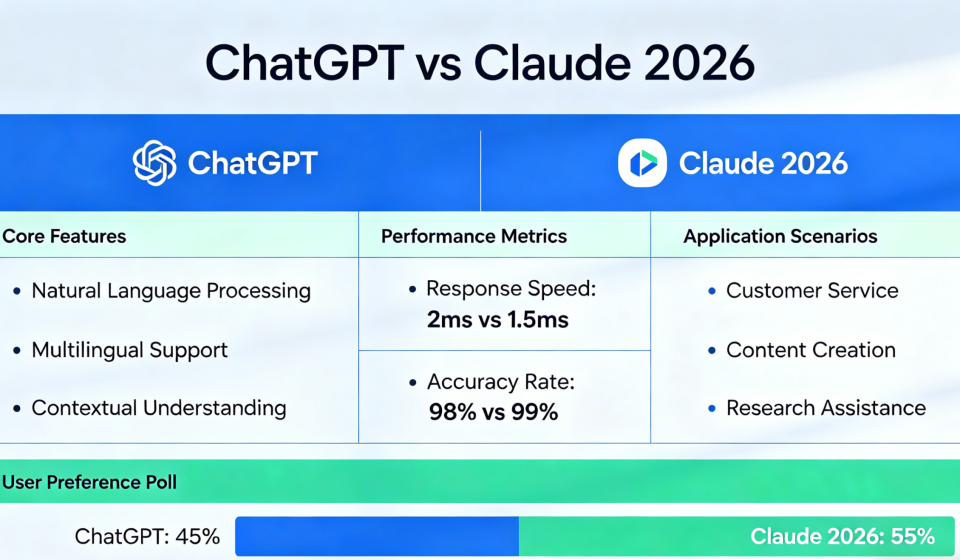
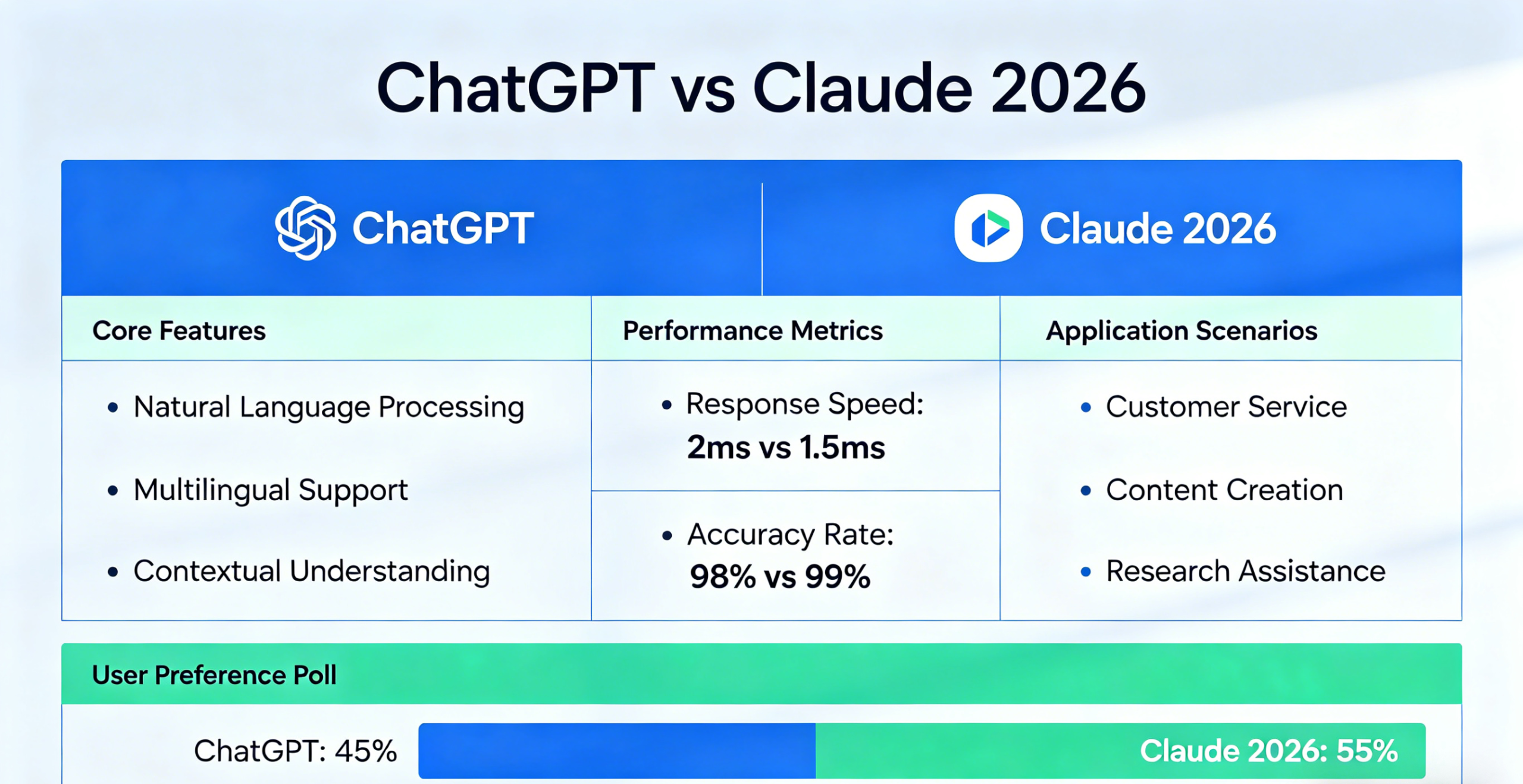
ChatGPT vs Claude 2026: Which AI is better for writing, coding, and research in 2026? Here’s My Honest Take
ChatGPT vs Claude 2026: Which AI is better for writing, coding, and research in 2026? Here’s My Honest Take
I’ve been using AI assistants daily since mid-2025. ChatGPT was my first love — it was everywhere, everyone used it, and it got the job done. But over the past year, I kept hearing more and more people switch to Claude. Developers praised its code quality. Writers said its prose felt more human. So I decided to stop guessing and start testing.
For six months, I used both ChatGPT and Claude side by side — every single day. I tested them across writing, coding, research, document analysis, and creative work. I paid for both subscriptions out of my own pocket. No affiliate bias, no sponsored content. Just honest, real-world results.
Here’s what I learned.
The Models I Tested (2026 Editions)
Both platforms have evolved significantly in 2026. Here’s what I was working with:
- ChatGPT: GPT-5.3 Instant (free tier) and GPT-5.4 Thinking (Plus plan, $20/month). OpenAI also released GPT-5.4 in March 2026, bringing improvements to spreadsheets, presentations, documents, and larger context processing.
- Claude: Sonnet 4.6 (free tier) and Opus 4.6 (Pro plan, $20/month). Anthropic released Claude Sonnet 4.6 in February 2026, featuring a 5x larger context window (1M tokens in beta) and new adaptive thinking capabilities.
The gap between these models has narrowed considerably. In 2024, there were clear winners in specific categories. In 2026, frontier models from Anthropic and OpenAI are within a few percentage points of each other on most benchmarks.
How I Tested — My Process
I didn’t rely on benchmarks or single tests. Instead, I integrated both AI assistants into my actual workflow for six months across these real-world tasks:
- Writing: Blog posts (like this one), email drafts, social media captions, product descriptions
- Coding: Python scripts, React components, debugging sessions, code refactoring
- Research: Summarizing articles, fact-checking, finding current information
- Document analysis: Processing long PDFs, analyzing legal documents, reviewing contracts
- Creative work: Brainstorming ideas, rewriting passages, exploring different tones
I used both the free and paid tiers to understand the full picture. Here’s what I discovered.
Writing Quality — Claude Wins by a Mile
This isn’t even close. Claude writes more naturally, with better voice consistency and nuance. When I need long-form content — blog posts, newsletter drafts, or detailed guides — Claude is my go-to.
Where Claude excels:
- Voice consistency: Claude maintains the same tone throughout long pieces. ChatGPT tends to drift or default to a generic “helpful assistant” voice.
- Nuance: Claude avoids corporate-speak and writes like a thoughtful human. ChatGPT often over-explains simple concepts and uses repetitive transitional phrases.
- Structure: Claude organizes long-form content better, with logical flow and natural transitions.
Where ChatGPT holds its own:
- Speed: ChatGPT generates responses faster for quick questions and short-form content.
- Creative flexibility: ChatGPT is slightly better at brainstorming wild ideas and exploring unconventional angles.
- Customer communication: ChatGPT excels at drafting emails, customer support responses, and friendly, approachable copy.
The consensus from developer communities aligns with my experience — Claude consistently outperforms ChatGPT on writing quality, instruction following, and nuanced tasks.
Context Window & Analysis — Claude’s Secret Weapon
This is where Claude pulls ahead significantly. Claude Sonnet 4.6 offers a 200K token context window (with 1M tokens available in beta), while ChatGPT’s GPT-5.4 Thinking handles around 128K-400K tokens depending on the version.
What does this mean in practice?
- I can upload entire codebases (hundreds of files) to Claude for review and analysis.
- Claude processes long legal documents, research papers, and books in one go without losing context.
- ChatGPT starts forgetting earlier information when documents exceed its limit, forcing me to break things into chunks.
For professional work involving long documents, Claude’s larger context window is a genuine advantage.
Claude Sonnet 4.6 also features adaptive thinking — the model can adjust its reasoning depth based on task complexity, spending more time on hard problems and less on simple ones. This makes it both smarter and faster where it counts.
Coding — Claude Takes the Lead (But ChatGPT Is Close)
Both tools are excellent for coding. But after months of side-by-side testing, Claude has a noticeable edge.
Claude’s strengths:
- Production-ready code: Claude writes cleaner, more maintainable code with proper error handling and edge case consideration.
- Understanding large codebases: Claude’s larger context window means it can actually read your entire project and understand dependencies.
- Complex instructions: When I give multi-step refactoring tasks, Claude stays on track better and completes all steps.
- Explaining algorithms: Claude excels at breaking down complex algorithms and architectural decisions.
ChatGPT’s strengths:
- Speed: ChatGPT generates solutions faster for quick fixes and boilerplate code.
- Debugging common patterns: ChatGPT is better at recognizing and fixing common error patterns quickly.
- Language conversion: ChatGPT handles converting between programming languages smoothly.
In benchmark tests, Claude Opus 4.6 scores 80.8% on SWE-bench Verified, while GPT-5.2 scores 80.0%. The difference is small, but real-world developers consistently report Claude produces more production-ready code with less refinement needed.
Research & Web Access — ChatGPT Wins
ChatGPT with web browsing is genuinely useful for research. Claude doesn’t have native web access (as of early 2026), which is its biggest weakness.
ChatGPT excels at:
- Current events and real-time data
- Fact-checking claims against recent sources
- Finding specific resources, articles, or documentation
- Summarizing recent news and developments
Claude’s limitation: Without web access, Claude relies entirely on its training data (which has a cutoff date). When I ask about recent events or new products, Claude either doesn’t know or gives outdated information.
If your work requires current information — market research, news analysis, or fact-checking — ChatGPT is the better choice.
Image Generation — ChatGPT Only
This is straightforward: ChatGPT has DALL-E built in. Claude has no image generation capabilities.
If you need to generate images for blog headers, social media, or product mockups, ChatGPT is your only option between these two. I use DALL-E 3 through ChatGPT Plus for all my visual content.
Pricing Breakdown — Similar but Different
Both platforms offer a free tier and paid plans starting at $20/month. But the details matter.
ChatGPT Pricing (2026)
- Free: Limited GPT-5 access, ads coming soon
- Go: $8/month — 10x more messages than free, GPT-5.2 Instant, file uploads
- Plus: $20/month — GPT-5.4 Thinking, DALL-E image generation, web browsing, Codex coding agent
- Pro: $100/month — 5x more Codex usage than Plus, access to GPT-5.4 Pro model
- Pro (Legacy): $200/month — 20x more Codex usage, maximum memory and context
Claude Pricing (2026)
- Free: Limited Sonnet 4.6 access, no Opus access
- Pro: $20/month ($17/month annual) — Opus 4.6, Sonnet 4.6, Claude Code, Cowork, Research, Projects
- Max 5x: $100/month — 5x more usage than Pro, priority access, higher output limits
- Max 20x: $200/month — 20x more usage, Claude in PowerPoint (preview), early access to new features
At the $20/month tier, both offer excellent value. ChatGPT Plus gives you image generation and web browsing. Claude Pro gives you better writing quality and coding performance. The choice depends on your priorities.
What I Liked About ChatGPT
- Web browsing: Essential for research and current information. Claude has nothing like this.
- Image generation: DALL-E integration is seamless and powerful. Claude can’t generate images at all.
- Speed: Faster responses for quick questions and simple tasks.
- Ecosystem: ChatGPT integrates with more third-party tools and has a larger plugin library.
- Voice conversations: The mobile app’s voice mode is excellent for on-the-go use.
What I Liked About Claude
- Writing quality: More natural, nuanced, and consistent. Claude writes like a human, not an AI.
- Context window: 200K tokens (1M beta) means I can upload entire projects and books.
- Coding: More production-ready code with better error handling and architecture.
- Instruction following: Claude stays on track with complex, multi-step tasks.
- Adaptive thinking: Claude adjusts reasoning depth based on task complexity — smarter where it counts, faster where it doesn’t.
- Claude Code: Terminal-based coding agent included with Pro plan at no extra cost.
- Skills feature: Create persistent instructions that Claude “discovers” automatically — perfect for brand voice and formatting preferences.
What I Didn’t Like About ChatGPT
- Writing can feel generic: ChatGPT defaults to a “helpful assistant” tone that gets repetitive.
- Context window limitations: Smaller than Claude’s, which matters for long documents.
- Coding requires more refinement: Solutions work but often need cleanup and edge-case handling.
- Ads coming to free tier: OpenAI plans to introduce ads on free and Go tiers — a disappointing shift.
What I Didn’t Like About Claude
- No web access: This is Claude’s biggest weakness. No real-time information, no fact-checking against current sources.
- No image generation: Text-only. You’ll need separate tools for visuals.
- Stricter usage limits on Pro: During heavy coding sessions, I hit Claude Pro’s Opus limits within 1-2 hours and had to wait for reset.
- Smaller ecosystem: Fewer third-party integrations and plugins compared to ChatGPT.
The Verdict — Which One Should You Choose?
After six months of daily use, here’s my honest take: neither is universally better. They excel at different things.
The Chatbot Arena rankings put Claude Opus 4.6 and GPT-5.2 in a statistical dead heat for general tasks. The real differences show up in specific categories.
Choose ChatGPT If:
- You need web browsing and real-time information
- You require image generation (DALL-E)
- Your work involves current events, market research, or fact-checking
- You want a larger ecosystem of third-party integrations
- Speed is your top priority for quick, simple tasks
Choose Claude If:
- You prioritize writing quality and natural prose
- You’re a developer who needs production-ready code
- You work with long documents, codebases, or research papers
- You need strong instruction following for complex, multi-step tasks
- You don’t need image generation or real-time web access
My Actual Setup — I Use Both
After six months, I’ve stopped trying to pick a winner. I use both daily:
- Claude for: All long-form writing, coding tasks, document analysis, and complex reasoning work
- ChatGPT for: Quick research questions, image generation, web-connected answers, and voice conversations
$40/month for both subscriptions is still cheaper than any single professional software tool. If you can afford it, using both gives you the best of both worlds.
But if I could only keep one? I’d keep Claude — barely. The writing quality, coding performance, and larger context window edge it ahead for my specific workflow. Your mileage may vary.
My final ratings:
- ChatGPT: ⭐ 4.4/5 — loses points for generic writing and lack of context, but wins on web access and image generation.
- Claude: ⭐ 4.6/5 — loses points for no web access and stricter usage limits, but wins on writing quality, coding, and context.
FAQ
Q: Is ChatGPT or Claude better for free users?
A: Both offer capable free tiers. ChatGPT’s free tier has GPT-5.3 Instant access. Claude’s free tier has Sonnet 4.6 access. For serious work, both require the $20/month Pro/Plus plans.
Q: Can Claude browse the web?
A: No. As of early 2026, Claude has no native web access. ChatGPT does.
Q: Can ChatGPT write as well as Claude?
A: For short-form content and customer communication, yes. For long-form, nuanced writing, Claude is noticeably better.
Q: Which is better for coding?
A: Claude produces more production-ready code with better error handling. ChatGPT is faster for quick fixes and common patterns. Most developers prefer Claude for serious coding work.
Q: Is the $20/month plan worth it for each?
A: Yes, if you use AI daily for professional work. Both ChatGPT Plus and Claude Pro unlock the best models and features. If you can afford both ($40/month), that’s the ideal setup.